Early access · Release date: November 5, 2026
UpdatedTruck World: Australia Tow Truck and Assistance Guide
Use the Truck World: Australia tow truck through roadside assistance. Learn how refueling, repairs, and recovery affect your cash and delivery deadlines.
Jump to

How to Call the Tow Truck
Stranded with freight behind you? The Truck World: Australia tow truck arrives through roadside assistance, helping you get moving when trouble interrupts a delivery. In the pre-release build, assistance costs money and advances time, so an emergency call can affect both your balance and your delivery deadline.
To request help:
- Stop the truck before requesting service.
- Open the CB radio menu.
- Select Roadside Assistance.
- Choose the service you need, such as Refuel or Repair.
An assistance vehicle physically arrives during the service sequence. The repair sequence also includes a departing tow truck that remains visible on the road afterward.
Use the service that matches your problem. An empty tank calls for refueling; a repair request addresses a different need.
Official page: Truck World: Australia (truckworldstudio.com)
Refueling, Repairs, and Road Recovery
The assistance options handle different situations:
 Image: www.truckworldstudio.com
- Refuel: Supplies emergency fuel when your tank runs dry.
- Repair: Requests mechanical assistance.
- Return to the road: Provides recovery when you need to get a vehicle or trailer back onto the road.
Emergency refueling gets you moving again, but it does not replace a proper fuel stop. In the pre-release build, a loaded truck needed another assistance call before reaching the station after an initial emergency refill.
After receiving fuel, open the map and head toward a fuel station. Avoid assuming the emergency supply will cover the remainder of a long delivery.
Road recovery also has a separate purpose from repairing the truck. If a trailer has ended up off the road, choose recovery rather than expecting a repair request to reposition it.
What Assistance Costs Your Delivery
Roadside assistance takes money out of your operating budget, and the service advances the in-game clock. That creates two immediate concerns: paying for help and finishing your contract before its deadline.
 Image: PlayStation Store
The pre-release build allows emergency refueling to push your balance below zero. Completing a delivery afterward can bring the account back into positive territory, but the payment still has to cover the expenses already incurred.
Keep money available for diesel and assistance before spending on upgrades. When a breakdown interrupts a job, check the remaining delivery time after service finishes.
Repeated calls can turn a straightforward haul into an expensive trip. Trailer recovery alone consumed more than 2,000 during a pre-release duplication bug, before additional fuel problems complicated the run. That amount reflects repeated recovery spending, rather than a standard charge for every call.
Refuel Manually Before You Need Another Call
Manual refueling is part of the game’s hands-on trucking routine. With realistic refueling enabled, stopping beside a pump is only part of the process:
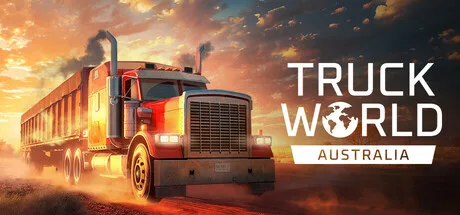 Image: Steam / Truck World Studio
- Park at the pump and shut off the engine.
- Leave the cab and pick up the fuel nozzle.
- Fill the truck.
- Return the nozzle.
- Pay for the fuel before driving away.
Remember the last two steps. Leaving the nozzle attached or walking back to the cab without paying interrupts the routine just when you are ready to leave.
Check the fuel gauge before accepting another haul, particularly after spending time maneuvering or dealing with a trailer problem. Use the map to locate a fuel station before the tank becomes an emergency.
Handle Trailer Problems Before Paying for Repeated Recovery
The pre-release build includes a trailer duplication bug that can cause overlapping trailers to collide and fling one away. If that happens at a pickup, stop repeating the same recovery request and check the job’s trailer requirements.
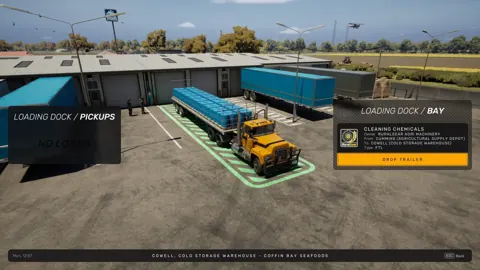
Early Access includes two delivery types: hauling a complete trailer and carrying individual cargo loads on your own flat-top trailer. Check which type you accepted before positioning your equipment at the pickup.
For a job that supplies its own trailer, leave your existing trailer clear of the pickup area before collecting it. Bring your flat-top when the contract requires cargo loaded onto your own trailer.
If a duplication problem persists, use the in-game feedback form. Include the active mission, the pickup location, and whether you arrived with a trailer attached so the report describes the sequence that triggered the problem.
Continue with
 Truck World: Australia Truck List: Early Access GuideTruck World: Australia truck list covers the single Early Access truck, hands-on hauling, limited upgrades, and plans for two new trucks and road trains.
More in Trucks
Truck World: Australia Customization Guide & Upgrades
Explore Truck World: Australia customization, learn how service stations work, compare paint pack options, and see what Early Access upgrades include.

Truck World: Australia Repair Guide: Service Stations
Truck World: Australia repair starts at a service station. Learn where to go, how to speak to the manager, and what maintenance Early Access lets you do.
Truck World: Australia Road Train: Early Access Guide
Truck World: Australia road train plans explained: learn what's playable in Early Access, what's coming later, and when the Steam release is scheduled.
Join the community
Official channels for news, updates and player help: