
Early access · Release date: November 5, 2026
UpdatedTruck World: Australia Walkthrough: Your First Hauls
Follow Truck World: Australia walkthrough to finish deliveries, build your yard, get the flat-top trailer, and plan profitable cargo runs in Early Access.
Jump to

First Run: Fuel Up and Choose a Contract
Your delivery starts before the wheels turn: fuel, trailer connections, and paperwork all need attention. This Truck World: Australia walkthrough takes you through the opening deliveries, setting up your yard, and getting into individual cargo jobs. Keep enough cash for the trailer shelter while you learn the hands-on work between drives.
The initial Early Access release covers the Eyre Peninsula, with 9 towns, one player-owned truck, and the first two story missions. Early Access launched on Xbox, Microsoft Store, and Epic Games Store on November 5, 2026; the Steam release is scheduled for 2027.
- Accept the radio tutorial. Let it guide your opening run, especially if you are used to trucking games with automatic trailer handling.
- Check your fuel before accepting a long trip. Drive to a service station and position the truck beside a pump.
- Get out and refuel manually. Hold the fueling interaction until you have added the fuel you need.
- Go inside and pay. Filling the tank and settling the bill are separate tasks.
- Choose a delivery contract. Select the job on the map to inspect its location, then accept it and activate navigation to the pickup.
Start with a short delivery to practice the complete pickup and drop-off process. Save longer routes for after you are comfortable with the right-hand driving position and left-hand traffic.
The opening progression leads through these milestones:
| Stage | Objective | Payment or equipment |
|---|---|---|
| Delivery contracts | Collect and deliver freight | Contract payment |
| A yard of our own | Transport a site office to your block | Office with a computer and bed |
| Word gets around | Arrange a trailer shelter and collect the farmer’s flat top | Trailer shelter and your own flat-top trailer |
Official page: Truck World: Australia (truckworldstudio.com)
Collect and Connect Your First Trailer
Reaching the pickup marker does not finish the collection process. Use the yard’s job terminal to request the trailer before trying to hitch it.
 Image: www.truckworldstudio.com
- Follow navigation to the pickup yard. Check the active contract if several map icons are nearby.
- Find the terminal and select Pull trailer. Leave the trailer placement area clear of your truck.
- Line up the truck with the trailer. Reverse carefully so the trailer’s kingpin aligns with the truck’s coupling.
- Complete the coupling interaction.
- Get out and raise the trailer’s support legs.
- Connect the trailer cables and hoses. Do not leave immediately after the truck couples to the trailer.
- Activate navigation to the delivery destination.
Walk around the connection area before pulling away. Check the coupling, support legs, and connections rather than relying entirely on the view from the cab.
Keep your opening jobs to one full trailer at a time. The ability to accept multiple contracts does not mean you can connect their trailers together: drivable road trains are planned for a future update and are absent from the initial Early Access release.
Drive to the Destination and Complete the Delivery
The loaded truck needs room to slow down, and tight delivery yards make rushed approaches expensive in time and maneuvering.
 Image: PlayStation Store
- Keep left when leaving the pickup yard. Pay particular attention after turns and when rejoining a road.
- Watch the navigation distance and upcoming turns. The route display includes travel time and distance; do not mistake the time estimate for mileage.
- Brake before reaching the entrance. Reduce speed early enough to turn into the yard without overshooting it.
- Position the trailer in the delivery space. Use the exterior camera to inspect clearance, and pull forward to correct your angle when needed.
- Lower the trailer’s support legs fully.
- Disconnect the cables and hoses, then release the coupling.
- Use the destination terminal and select Drop trailer.
- Read the delivery message. Check the final payment and any new messages before taking another job.
If the trailer refuses to detach because its cables remain connected, return to the connection points and disconnect them. Complete the physical handoff before using the terminal to finish the contract.
For tight parking, make small corrections instead of forcing the trailer through a bad angle. Parking assistance is also available during the opening delivery.
A yard of our own: Bring Home the Office
After the early hauling jobs, watch for A yard of our own. This story assignment sends you to collect a site office from Port Lincoln and bring it to your block.
 Image: Steam / Truck World Studio
The office delivery has no freight payment. Its value is the base it establishes, so keep money available for fuel and the next construction task.
- Select the story job and navigate to the supplier in Port Lincoln.
- Collect the trailer carrying the site office.
- Couple the trailer, raise its support legs, and connect its cables.
- Set navigation to the block. Change the destination after pickup so you are following the return leg.
- Drive the office back and complete the marked delivery. Take corners slowly with the building aboard.
- Enter the office after it is placed.
Inside, you gain access to a computer for base development and a bed for rest. Use the bed when you need to recover from fatigue, and check the displayed rest duration before sleeping.
The computer becomes the next progression stop. Open its building options when the following story task asks you to arrange trailer storage.
Word gets around: Build the Shelter and Collect the Flat Top
The next story beat introduces a farmer offering an old flat-top trailer. In return, you need to transport his donated materials for the new jetty at Coffin Bay.
This is also where the trailer shelter becomes a major expense: it costs $20,000 in the opening Early Access build.
- Use the office computer. Open the building options and arrange construction of the trailer shelter.
- Keep the shelter cost in mind before spending on other upgrades. Complete additional delivery contracts if you need more money.
- Follow the mission objective to the farm.
- Collect the farmer’s flat-top trailer. Complete the coupling, support-leg, and cable interactions before leaving.
- Follow the mission destination to deliver the donated materials to Coffin Bay.
Getting your own flat top opens the other delivery format: transporting individual cargo loads rather than collecting a complete trailer for every contract.
Keep the distinction clear when choosing work. Full-trailer contracts supply the trailer you haul, while individual cargo contracts use your own flat top.
Plan Your First Combined Cargo Run
With the flat top available, you can combine individual loads on one trip. The launch build allows up to three active jobs, giving you room to plan pickups and deliveries along a shared route.
- Choose an individual cargo job and inspect its destination.
- Look for another job along the same route. Compare its pickup and delivery locations before accepting it.
- Collect the cargo and open the loading layout. The trailer uses a grid for arranging the loads.
- Arrange the cargo with balance in mind. Use the automatic organization option if you want help with placement.
- Get out and strap down the cargo by hand.
- Follow your planned delivery order. Check the active destination after each stop before continuing.
Think about the trip as a sequence of stops. For example, combine a delivery to the next town with another going farther along the same road, rather than accepting jobs that send you in opposite directions.
Use the loading screen to assess how your cargo fits before adding more work. After rearranging the load, finish the tie-down interactions before driving away.
Repeatable contracts continue beyond the opening story content. The handcrafted portion takes approximately 3 hours, while hauling remains available afterward; use those runs to practice cargo placement, improve your routes, and fund the truck and base upgrades included in this build.
Continue with
 Truck World: Australia Job System Guide to DeliveriesLearn the Truck World: Australia job system, complete trailer deliveries, unlock flat-top cargo jobs, and combine contracts to earn more on each delivery.
More in Guide
See all Guide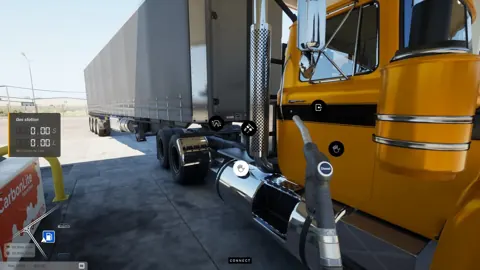
Join the community
Official channels for news, updates and player help: